Ever wondered how many SIM cards are registered under your name? In Pakistan, where mobile connectivity is a daily necessity, keeping track of your SIM registration is more important than ever. The Pakistan Telecommunication Authority (PTA) has made it incredibly easy to monitor and verify SIM cards linked to your CNIC, helping millions of Pakistanis protect themselves from fraud and identity theft.
SIM registration isn’t just a formality—it’s your first line of defense against cybercrime. With the rise of digital fraud, unauthorized SIM registrations have become a serious concern. Criminals can misuse unmonitored SIMs for illegal activities, leaving innocent citizens to face the consequences. That’s why checking your PTA SIM information regularly has become essential in 2025.
In this comprehensive guide, you’ll learn everything about the PTA SIM information system: how to check registered SIMs on your CNIC, verify ownership details, remove unauthorized registrations, and keep your digital identity secure. Whether you’re using Jazz, Zong, Ufone, or Telenor, this guide covers all networks with step-by-step instructions.
Table of Contents
What is PTA SIM Information System?
The PTA SIM Information System is a government-backed digital platform designed to track and manage mobile SIM card registrations across Pakistan. Launched to combat fraud and enhance national security, this system maintains a comprehensive database of all active SIM cards linked to citizens’ CNICs.
At its core, the system works through a collaboration between PTA and NADRA (National Database and Registration Authority). When you purchase a SIM card, your CNIC details are verified through NADRA’s database and registered with PTA. This cross-referencing ensures that every active SIM in Pakistan is traceable to a verified citizen.
The legal framework behind this system stems from Pakistan’s Prevention of Electronic Crimes Act and telecom regulations. These laws mandate that all SIM cards must be registered against valid CNICs. Mobile operators are legally bound to verify customer identity before activation, creating accountability in the telecom sector.
This system has proven invaluable for law enforcement, helping authorities track criminal activities while protecting ordinary citizens from identity-related crimes. For users, it provides transparency—you can instantly see how many SIMs are registered under your name and take action if something seems wrong.
Why You Should Verify Your SIM Information
Verifying your SIM information isn’t optional—it’s a critical security practice every Pakistani should adopt. Unverified or unauthorized SIMs pose serious risks that extend far beyond simple inconvenience.
Identity theft tops the list of dangers. Criminals often register SIMs using stolen or fake CNICs, then use these numbers for fraudulent activities—from online scams to banking fraud. If a SIM registered under your CNIC is misused, you could face legal consequences or financial losses. Regular verification helps you catch these unauthorized registrations early.
Fake SIMs have been used in everything from harassment cases to terrorist activities. The government takes SIM misuse seriously, and if your CNIC shows suspicious activity, you might face questioning or legal scrutiny. Staying on top of your registrations protects you from being unknowingly implicated.
According to PTA guidelines updated in 2025, individuals are allowed a maximum of five SIMs per CNIC under normal circumstances (with provisions for business users to register more through proper channels). Exceeding this limit without authorization can result in all your SIMs being blocked.
Regular checks also help you maintain digital hygiene. Many people forget about old SIMs from previous numbers or networks. These dormant registrations can be reactivated by malicious actors if not properly deactivated. By monitoring your PTA SIM information quarterly, you ensure complete control over your telecommunications footprint.
How to Check PTA SIM Information Online (Step-by-Step Guide)
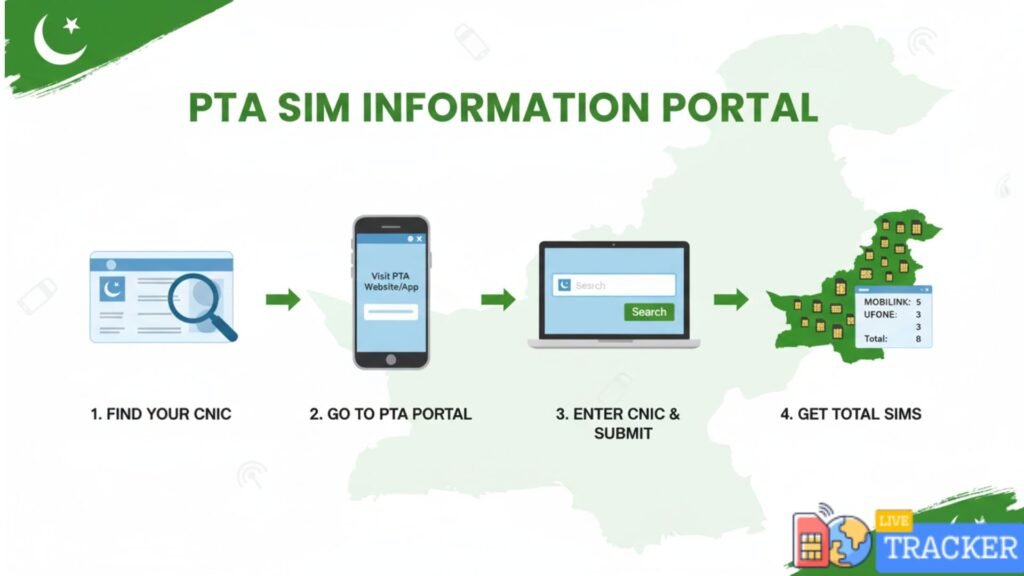
Checking your PTA SIM information online is straightforward and takes less than two minutes. Here’s the complete process:
Step 1: Open your web browser and visit the official PTA SIM Information portal at https://cnic.sims.pk
Step 2: You’ll see a simple form asking for your CNIC number. Enter your 13-digit CNIC without dashes (for example: 1234567890123)
Step 3: Complete the security verification (CAPTCHA) to confirm you’re not a robot
Step 4: Click the “Submit” or “Check” button
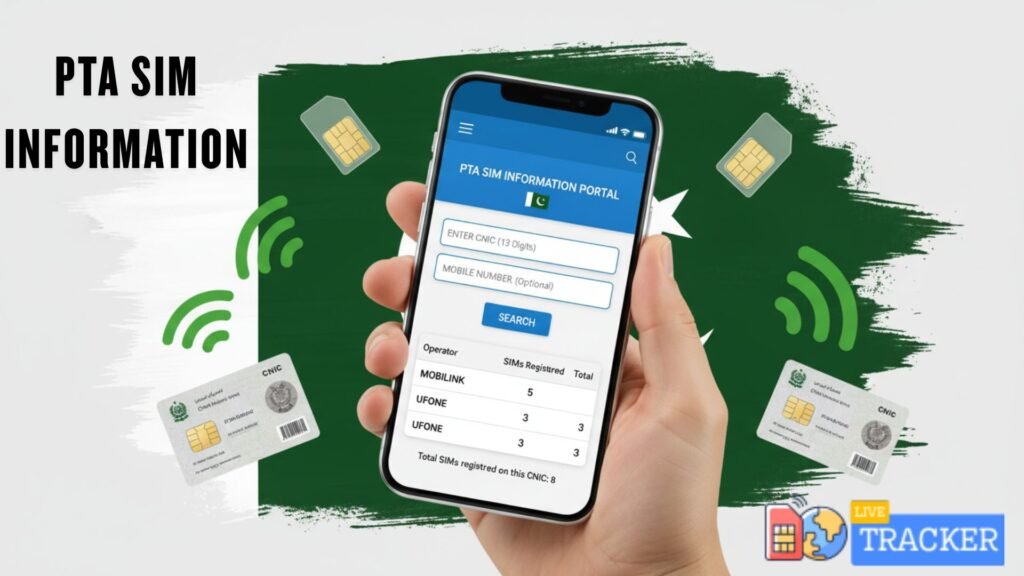
Step 5: Within seconds, the system displays complete information including:
- Total number of SIMs registered on your CNIC
- Network operator names (Jazz, Zong, Ufone, Telenor)
- Approximate registration dates
- Status of each SIM (active/inactive)
The portal is mobile-friendly, so you can check from any smartphone or tablet. The information is real-time and directly pulled from the national database, ensuring accuracy. No registration or login is required—simply enter your CNIC and get instant results.
Pro Tip: Take a screenshot of your results and keep it in your records. This serves as proof of your legitimate SIMs if you ever need to dispute unauthorized registrations.
How to Check SIM Information via SMS
For those who prefer quick mobile access or have limited internet connectivity, PTA offers an SMS-based verification service. This method is particularly useful in remote areas or when you need immediate information on the go.
How to Use SMS Method:
- Open your phone’s messaging app
- Type your 13-digit CNIC number (without dashes)
- Send it to 668
- You’ll receive an automated reply within 30-60 seconds
Reading the Response:
The reply message shows the total count of SIMs registered on your CNIC and lists the network operators. For example: “Total SIMs: 4 (Jazz-2, Zong-1, Telenor-1)”
Comparison: SMS vs. Online Method
| Feature | SMS Method | Online Method |
|---|---|---|
| Speed | Very fast (30 seconds) | Fast (2 minutes) |
| Detail Level | Basic count & networks | Detailed information |
| Internet Required | No | Yes |
| Cost | Standard SMS charges | Free (with internet) |
| Accessibility | Any mobile phone | Smartphone/computer needed |
The SMS method is excellent for quick checks, but the online portal provides more comprehensive details. Most users combine both methods—using SMS for routine checks and the website when they need detailed information.
How to Verify SIM Owner Details in Pakistan
Verifying SIM ownership requires understanding both legal methods and privacy boundaries. While you can check your own SIM information freely, accessing someone else’s details has legal restrictions.
Checking Your Own SIMs:
Use the official PTA portal or contact your network operator’s helpline directly:
- Jazz: Dial 111 or visit jazz.com.pk
- Zong: Call 310 or check zong.com.pk
- Ufone: Dial 333 or visit ufone.com
- Telenor: Call 345 or check telenor.com.pk
These official channels can confirm ownership details, activation dates, and registration status for your numbers.
Verifying Unknown Numbers (Legally):
If you receive suspicious calls or messages, you cannot legally access someone else’s personal details without proper authorization. However, you can:
- Report the number to PTA’s complaint portal
- Contact FIA’s cybercrime wing for harassment cases
- Use official complaint channels where authorities handle verification
Important Legal Note: Using third-party apps or services claiming to reveal anyone’s SIM owner details is illegal under Pakistan’s cybercrime laws. These services often compromise privacy and may expose your own data to risks.
How to Remove Unused SIMs Registered on Your CNIC
Multiple unused SIMs create security vulnerabilities and management headaches. Here’s how to clean up your SIM registrations effectively.
Why Remove Unused SIMs:
- Prevents unauthorized reactivation by criminals
- Keeps you within PTA’s 5-SIM limit for individuals
- Reduces risk of identity misuse
- Simplifies tracking of active numbers
Removal Process:
- Identify Unwanted SIMs: Use the PTA portal to list all registered SIMs
- Contact Network Operators: Call the respective network’s helpline for each SIM you want to remove
- Request Deactivation: Provide your CNIC and number details for verification
- Confirm in Writing: Some operators require written requests or franchise visits
- Verify Removal: Check PTA portal after 48 hours to confirm deactivation
PTA Complaint System:
If networks refuse to remove unauthorized SIMs, file a complaint:
- Visit https://complaintmanagement.pta.gov.pk
- Submit details with evidence (PTA portal screenshots)
- PTA typically resolves complaints within 7-10 working days
Prevention Tips:
- Always formally surrender SIMs at franchises when switching numbers
- Request deactivation receipts
- Never share CNIC copies with unauthorized vendors
- Monitor your PTA SIM information quarterly
PTA SIM Verification for Each Network (2025 Update)
Each mobile network in Pakistan offers specific verification methods. Here’s the complete breakdown for 2025:
Jazz SIM Verification:
- SMS Method: Send your CNIC to 667
- Online: Visit jazz.com.pk and use the SIM verification tool
- Helpline: 111 (24/7 support)
- App: Use Jazz World app for instant verification
Zong SIM Registration Check:
- SMS: Type CNIC and send to 668
- Online Portal: my.zong.com.pk/verify
- Customer Service: 310 from Zong numbers
- Franchise Visit: For detailed ownership documents
Ufone SIM Information:
- SMS Verification: Send CNIC to 668
- Website: ufone.com/verify-sim
- UAN: 333 for customer support
- Ufone app available for digital verification
Telenor SIM Check:
- SMS: Forward CNIC to 668
- Online: Check at telenor.com.pk
- Helpline: 345 for assistance
- My Telenor app offers mobile verification
All networks have standardized their verification processes to comply with PTA regulations. The SMS method works across all operators using code 668, making it the most universal option.
Common Issues & Solutions
Users frequently encounter specific problems when checking PTA SIM information. Here are the most common issues with proven solutions:
Problem 1: SIM Not Showing on PTA Portal
Possible Causes:
- Recently purchased SIM (registration takes 24-48 hours)
- Incomplete biometric verification
- System synchronization delay
Solutions:
- Wait 48 hours after purchase and recheck
- Visit your network’s franchise with CNIC to complete verification
- Contact PTA helpline at 0800-55-055 for database queries
Problem 2: Incorrect Number of SIMs Displayed
Possible Causes:
- Old deactivated SIMs still in database
- Duplicate entries due to system errors
- SIMs registered by retailers without your knowledge
Solutions:
- Cross-verify with each network operator individually
- File complaint on PTA portal if discrepancies persist
- Request manual database audit through PTA helpline
Problem 3: Lost or Blocked SIM Verification
Scenario: Your SIM is lost/stolen or blocked by PTA
Immediate Actions:
- Block the SIM through network helpline immediately
- Verify blocking through PTA portal
- If wrongly blocked, submit restoration request with proof of ownership
Problem 4: Unknown SIMs on Your CNIC
This is serious:
- Immediately report to your nearest FIA cybercrime office
- File complaint on PTA portal
- Contact respective networks for registration details
- Request immediate deactivation with CNIC verification
Customer Support Contacts:
- PTA Helpline: 0800-55-055
- PTA Complaint Portal: complaintmanagement.pta.gov.pk
- Cybercrime Helpline: 1991
Conclusion
The PTA SIM information system has revolutionized how Pakistanis manage their mobile identities. In 2025, with digital fraud at an all-time high, regularly checking your SIM registrations isn’t just smart—it’s essential for your security and peace of mind.z
By using the official PTA SIM information portal at cnic.sims.pk, you maintain complete transparency over your telecommunications footprint. This simple two-minute check can save you from identity theft, legal complications, and the hassle of dealing with unauthorized registrations.
Remember to verify your SIM information quarterly, remove unused registrations promptly, and never rely on third-party websites claiming to offer SIM checks. The official PTA portal is your trusted source for accurate, real-time information about all SIMs registered on your CNIC.
FAQs
Q1: How many SIMs can be registered on one CNIC in 2025? Pakistani citizens can register up to 5 SIMs per CNIC under standard rules, with additional allowances for business users through proper authorization.
Q2: Is PTA SIM information check free? Yes, checking SIMs via the PTA portal is completely free; SMS method incurs standard messaging charges from your operator.
Q3: Can I check someone else’s SIM registration? No, legally you can only check SIMs registered on your own CNIC; accessing others’ information without authorization is illegal under cybercrime laws.
Q4: What should I do if my CNIC shows unknown SIMs? Immediately file a complaint on the PTA portal, contact the respective networks for deactivation, and report to FIA if fraud is suspected.
Q5: How often should I check my PTA SIM information? Security experts recommend checking your SIM registration at least once every three months to catch unauthorized registrations early.